When your team is busy all day but customers still wait, orders still get stuck, and leaders still rely on spreadsheets to understand performance, adding more effort won’t solve the problem. The process itself may be limiting growth.
For businesses between $3 million and $50 million in revenue, and especially those moving from $3 million toward $10 million, process optimization is the work of making everyday operations easier to manage, measure, and repeat. The goal isn’t to create more procedures. It’s to remove friction so your business can handle more volume without depending on heroics.
Start with one important workflow
Don’t begin by trying to fix everything. Choose a process that is frequent, costly, customer-facing, or prone to errors. Good starting points include:
- Quote-to-cash, from customer approval through payment
- Order-to-delivery, including inventory and fulfillment
- Customer onboarding, from signed agreement to service start
- Month-end close, from transaction capture through reporting
- Project approval and job costing, from estimate through final margin review
Define the process’s start and finish in plain language. For example: “It starts when a customer approves a quote and ends when the invoice is paid.” A clear boundary helps your team measure the same thing and prevents the discussion from expanding into every adjacent problem.
A useful rule: choose a process your team can examine closely and improve within a few weeks, not a broad goal like “fix operations.”
Map what actually happens, not what the procedure says
Bring together the people who do the work and the people who receive it. Walk through several real examples, including one that went smoothly and one that got delayed or corrected.
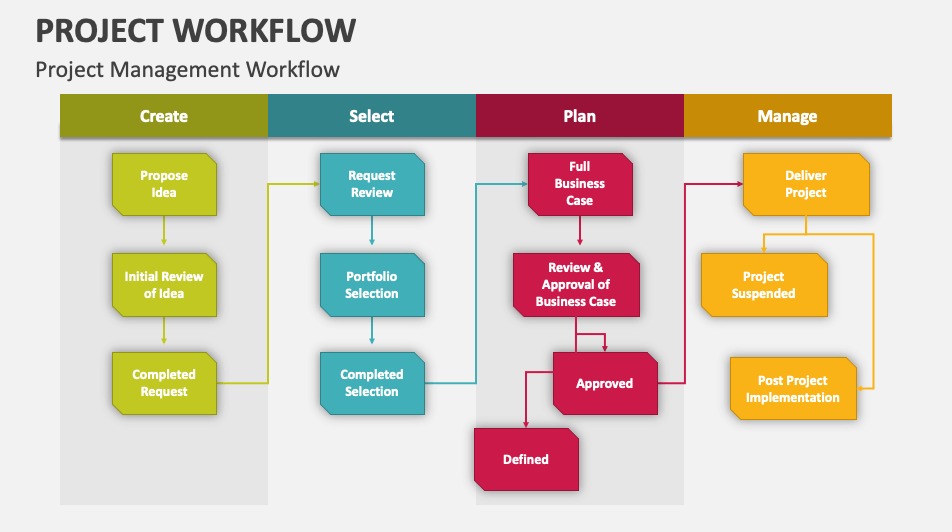
Map each step, handoff, approval, system entry, queue, and rework loop. For every step, capture:
- Who owns it, and what information do they need?
- What must be true for the work to move forward?
- How long does the work take, and how long does it wait?
- How often is information missing or work sent back?
- Which tools or spreadsheets are involved?
This is where leaders often discover that the documented workflow and the working workflow are different. A sales team may believe an order is handed off when the contract is signed. Operations may consider the handoff complete only after specifications, pricing, and delivery requirements are confirmed.
That gap creates delays, and it can be invisible in reports that track only total sales or completed jobs. A value-stream map can help show how work moves from beginning to end, including the queues and handoffs that slow it down.

Find the bottleneck before you add capacity
The bottleneck is the step that cannot keep up with demand. It might be a single approval, a specialist who reviews every job, incomplete information at intake, or an inventory check that happens only once a day.
Look for evidence:
- A growing queue before one step
- Long waits between tasks
- Repeated urgent requests to “push this through”
- Work that is routinely returned for missing details
- One role or team that is constantly overloaded
Consider a hypothetical growing service company. Sales closes work quickly, but project setup waits for an operations manager to verify scope, materials, and labor. The problem may not be a shortage of project managers. It may be inconsistent sales-to-operations handoffs that cause the same information to be chased down repeatedly.
Fixing the actual constraint is more useful than optimizing a step that isn’t holding up delivery. If you improve a non-bottleneck step, you may simply create a larger pile of unfinished work before the constrained step.
Simplify the process before you automate it
Technology can make a good process faster and a confusing one harder to understand. Before adding automation, ask whether each step is necessary, whether decisions can be made closer to the work, and whether the next person receives complete, usable information.
Practical changes might include:
- One standard intake form instead of scattered emails
- Clear approval limits based on cost or risk
- A “ready for review” checklist to prevent incomplete submissions
- Fewer handoffs and duplicate data entry
- A shared status view that shows ownership and next action
- Templates for recurring customer or project requirements
- Automatic reminders for overdue work
For example, a company that needs several leaders to approve routine purchases could set role-based approval limits. Higher-risk or higher-cost purchases still receive appropriate review, while standard requests move forward without waiting for every approver.
The principle is simple: standardize the repeatable work and make exceptions visible. Don’t force every situation into a rigid process, but don’t make routine work an exception either.
Choose a small set of measures
A process improvement is only useful if you can tell whether it helped. Establish a baseline before you make changes, then review a few measures consistently:
- Lead time: Elapsed time from the start of the process to the defined finish
- Wait time: Time work spends in a queue or awaiting information or approval
- Throughput: Number of completed orders, jobs, or requests over a set period
- First-pass yield: Percentage of work completed correctly without rework
- On-time completion: Percentage completed by the promised date
- Rework hours or cost: Time and expense spent correcting avoidable problems
Keep active work time separate from total elapsed time. A task that takes one hour to complete may still take six days to deliver if it sits in queues, waits for an approval, or gets returned for missing information.
For first-pass yield, the American Society for Quality’s glossary provides a useful definition: the share of units that meet requirements without being scrapped or reworked. Tracking this by process step helps you find where defects begin, not just where they are finally noticed.

Run a focused pilot and learn from the results
Test your proposed changes in one team, location, or workflow before rolling them across the business. Agree on the change, who owns it, how long the pilot will run, and which measures matter.
A practical 30-day sequence might look like this:
- Days 1–5: Choose one workflow, define its start and finish, and record baseline performance.
- Days 6–12: Map real cases with the people who do the work. Identify delays, rework, and unclear ownership.
- Days 13–18: Confirm the bottleneck and choose one or two changes to test.
- Days 19–26: Run the pilot and check in with the team. Note unexpected effects and exceptions.
- Days 27–30: Compare results with the baseline. Keep, adjust, or reverse the changes, then document the new standard.
Don’t judge a pilot by activity alone. A new form is not a result. Look for evidence: shorter lead time, fewer returned requests, more predictable delivery, less time spent reconciling data, or improved customer follow-up.
Build process improvement into how you operate
As a business grows, a better workflow should not depend on one person remembering every detail. Assign a process owner, clarify responsibilities, and review performance regularly. If demand, products, staffing, or systems change, revisit the workflow rather than letting workarounds become the new normal.
This is where process design connects to measurement, leadership, and technology. In Brown Paper Analytics’ Process & Efficiency pillar, the focus is on cleaner handoffs, less rework, and higher throughput. Measurement & Clarity helps leaders use shared definitions and performance information to make timely decisions.
For many growing businesses, ERP is essential operating infrastructure, not just another software purchase. A properly designed system can connect orders, projects, inventory, approvals, and finance so work and information move together. But it should support a workflow your team understands, not automate confusion. Treat implementation as part of an ongoing operating model: map the work, simplify it, configure the system, train people, measure adoption, and improve as the business changes.
“Too expensive,” “too disruptive,” or “we’ll do it later”?
Those are reasonable concerns. A large, all-at-once redesign can be costly and disruptive. But leaving a costly workflow untouched also has a price: more manual follow-up, slower billing, missed handoffs, rework, and limited visibility into capacity.
Start with a contained process and a phased roadmap. Keep tools that work; change them only when the evidence points to a real limitation. Involve employees early, pilot changes before broad rollout, and protect the time needed for training. That approach makes improvement more manageable while helping you see where investment can produce meaningful results.
The risk of waiting is that volume grows while the same informal process struggles to keep up. What worked when the founder could personally check every order may not work when several teams, locations, or service lines depend on consistent handoffs.
Turn a busy operation into a repeatable one
Sustainable growth doesn’t come from asking people to work harder around broken processes. It comes from finding where work stalls, removing unnecessary friction, and creating clear standards and measures that help the team deliver reliably.
If your business is ready to scale, request a process-to-system roadmap. Brown Paper Analytics will help you assess a priority workflow, identify bottlenecks, and define practical next steps for a phased improvement plan.